Dynamic OG Tags in a CSR Application with CloudFront Functions
Web | November 19, 2025
Introduction
What happens when you share a Naver link in KakaoTalk or Slack? The platform displays a preview card containing the link's image, title, and description.

This preview is the first thing people see before opening a link, so it strongly affects whether they decide to click it. An empty image or incorrect information makes the link harder to trust, which hurts both the user experience and click-through rate.
This post describes how our team investigated and resolved that problem.
Requirement
Our service, Moitz, creates a URL from the content a user views, and the user can share that URL. Results created with condition A and condition B contain different information, so their shared preview should also be different.
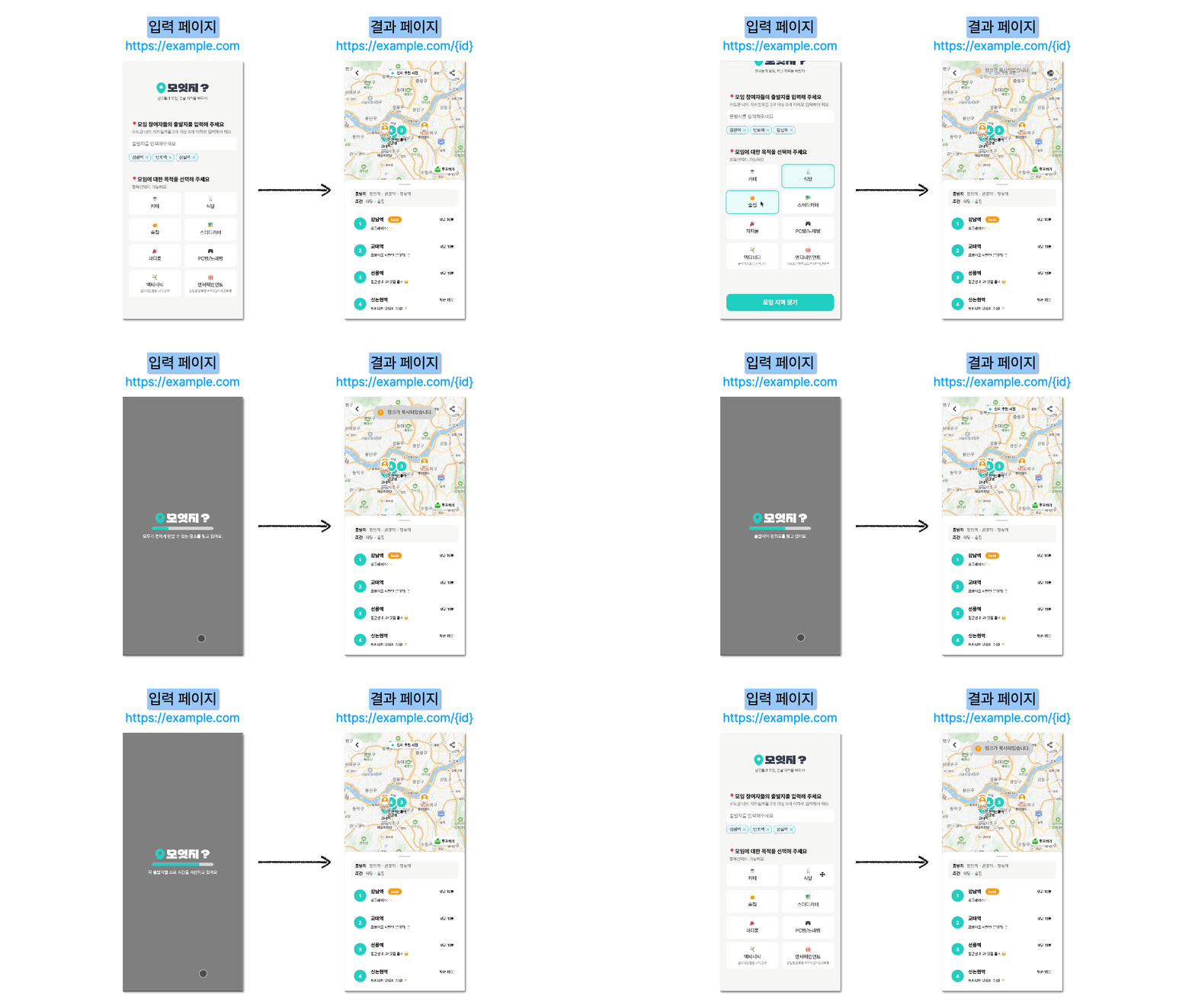
However, every result URL showed the same default preview in social media and messengers.


We wanted recipients to understand the result before opening the link. In other words, the preview needed a dynamically generated title and a content-specific thumbnail.

We defined the requirement as follows:
When a result URL is shared, its metadata must reflect the appropriate content dynamically.
What are OG tags?
To solve the problem, we first need to understand the Open Graph protocol, commonly called OG tags. Open Graph was introduced by Facebook in 2010 to provide standardized metadata that lets a web page become a rich object in social platforms such as Facebook, KakaoTalk, and Slack.
<head>
  <title>Title</title>
  <meta property="og:title" content="Page title" />
  <meta property="og:description" content="Page description" />
  <meta property="og:image" content="Image URL" />
  <meta property="og:url" content="Page URL" />
  <meta property="og:type" content="Page type" />
</head>
Put simply, these <meta> tags in the HTML <head> let developers control the title, description, and image on a link preview card.
How platforms create a preview card
After a link is shared, the platform sends a scraper—or bot—to the URL. The bot downloads the page HTML, parses its <head>, and collects the og: metadata.

The platform then uses that information to create a card like this.

Why, then, did every preview in our service look the same? The reason was our rendering model: client-side rendering (CSR).
CSR vs. SSR
Web pages are commonly rendered with CSR or server-side rendering (SSR).
SSR (Server-Side Rendering)
With SSR, the server combines the required data and returns a complete HTML document for each request. Both people and bots receive finished content from the beginning.

CSR (Client-Side Rendering)
In our CSR application, the server returns an empty HTML shell such as <div id="root"></div> along with JavaScript files. The browser downloads and executes the JavaScript before it can render the actual content.

CSR applications are often single-page applications (SPAs). Although users may visit /home or /result, the server has only one physical file: index.html.
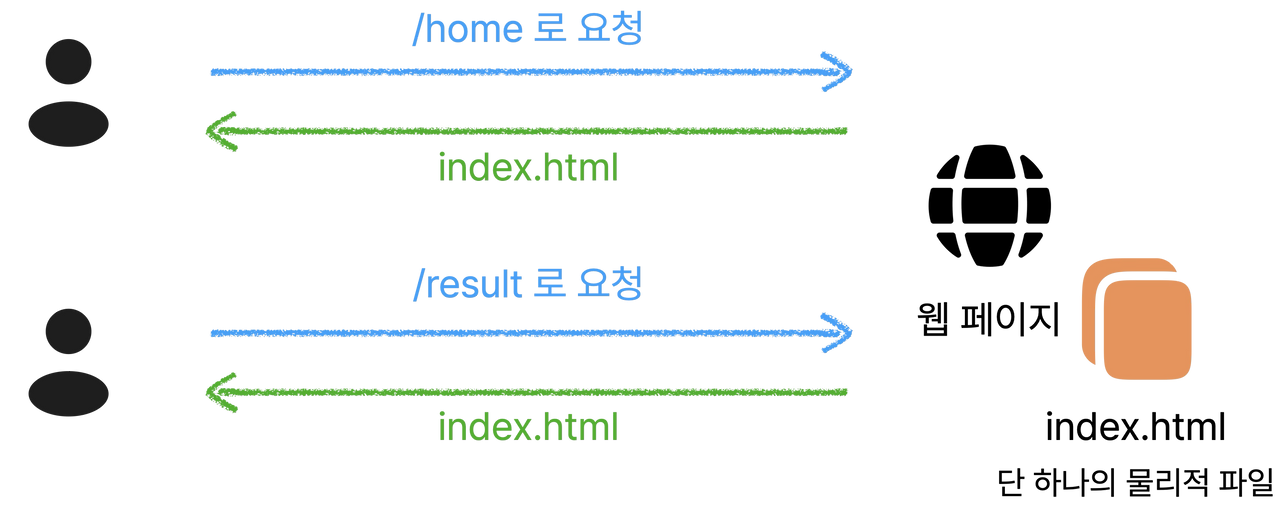
The server returns that same empty index.html for every URL. The browser changes the screen only after JavaScript runs, so the OG tags in the original document are necessarily fixed.
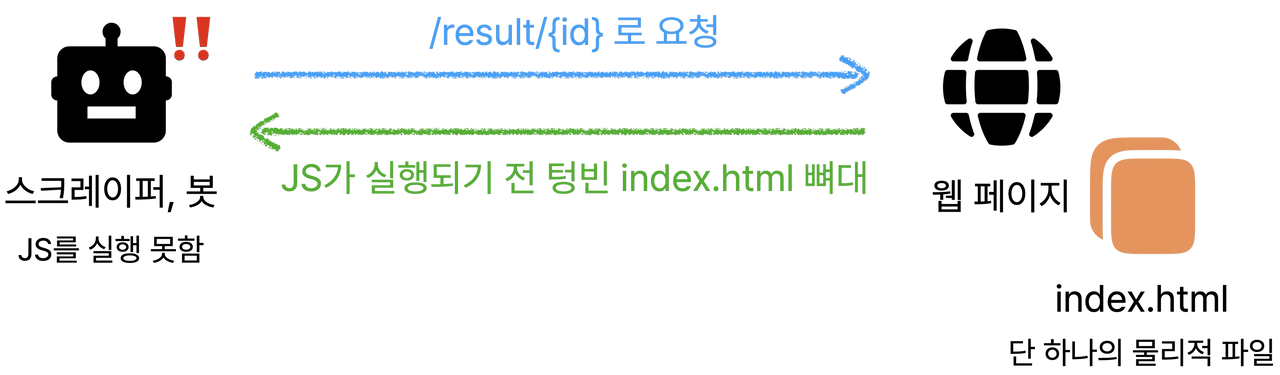
Preview bots from KakaoTalk and Facebook are not modern browsers that wait for our React application to render. Even if a bot requests /result/{id}?count={count}&place={place}, it receives the empty HTML shell and reads only the default hard-coded OG tags. It never sees React's dynamic og:title.
Should we migrate to SSR?
The conventional answer is to migrate the whole project to an SSR framework such as Next.js. SSR generates dynamic HTML for every request, so bots receive the correct OG tags.
For one dynamic metadata requirement, though, a full migration was too expensive. We looked for a solution that preserved our existing infrastructure.
Static hosting with S3 and CloudFront
Our service uses a typical static hosting architecture with AWS S3 and CloudFront.
- Amazon S3 stores built static files such as
index.htmlandapp.jsas the origin. - Amazon CloudFront sits in front of S3 as a CDN, caching and delivering files from edge locations.
The key was CloudFront's edge-computing capability: it can run custom code during the request and response lifecycle instead of merely caching static resources.
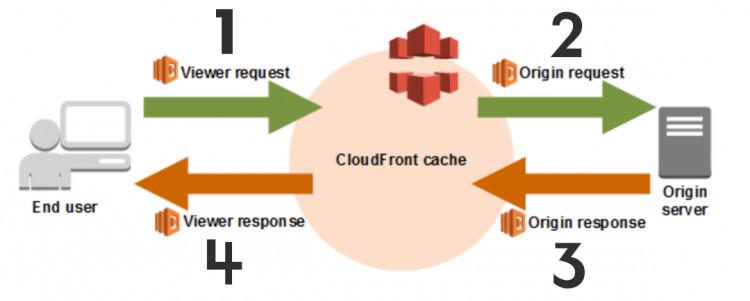
CloudFront has four stages, from Viewer Request to Viewer Response. We designed the flow so that an edge function returns dynamic OG tags only when it detects a bot.
Lambda@Edge vs. CloudFront Functions
AWS provides two main ways to run code at the edge: Lambda@Edge and CloudFront Functions.
| Category | CloudFront Functions (CFF) | Lambda@Edge (L@E) |
|---|---|---|
| Execution location | Every CloudFront edge location | Regional edge cache |
| Latency | Less than 1 ms | Tens to hundreds of ms |
| Runtime | Lightweight JavaScript (ECMAScript 5.1) | Node.js, Python |
| Network/file access | Not available | Available, including S3 and DynamoDB |
| Request/response body access | Not available | Available at Origin Request/Response |
| Typical use | Header/URL changes, redirects, lightweight responses | Integrations and complex body changes |
Lambda@Edge is a versatile tool for complex work, while CloudFront Functions are extremely fast and inexpensive for lightweight JavaScript logic.
Considering Lambda@Edge
Our first idea was to use Lambda@Edge to fetch the original index.html from S3 with GetObject, modify its tags, and return it to the bot.
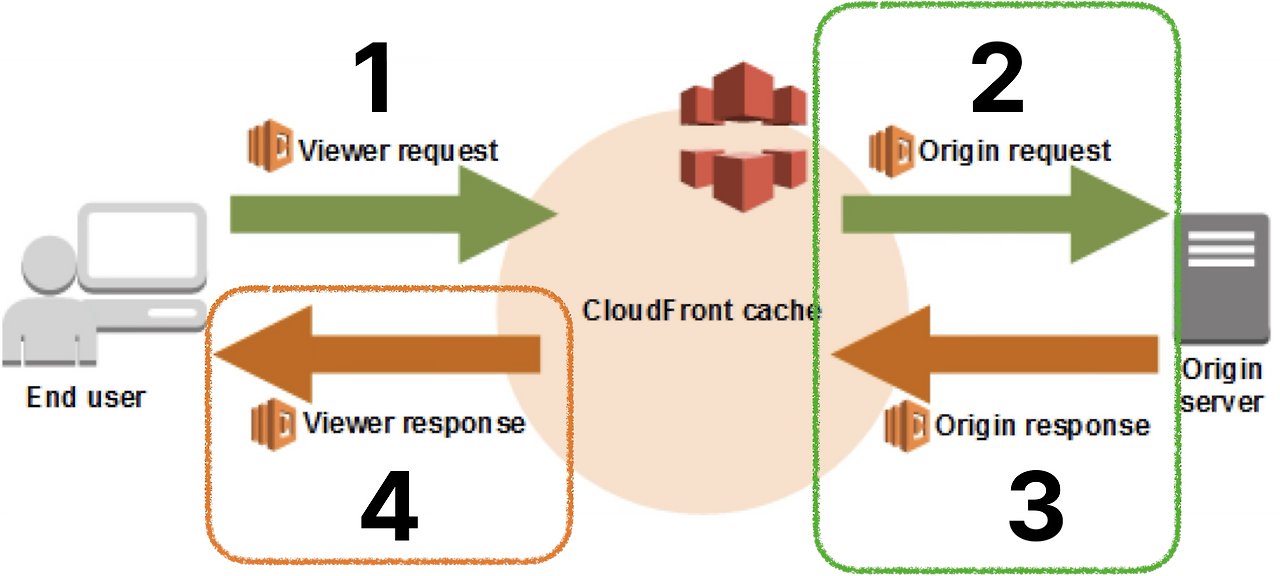
This approach has a drawback: body modification is limited to Origin Request and Origin Response. The function must reach the S3 origin, which adds a network round trip, cost, and infrastructure work such as GetObject permissions.
That led to a more fundamental question:
Do we actually need the original HTML file just to show a bot some metadata?
Solving it with CloudFront Functions
The answer was no. A preview bot only needs the metadata in <head>; it does not need the React bundle, CSS, or page body. At the edge, we can generate a small HTML document containing only the required tags.
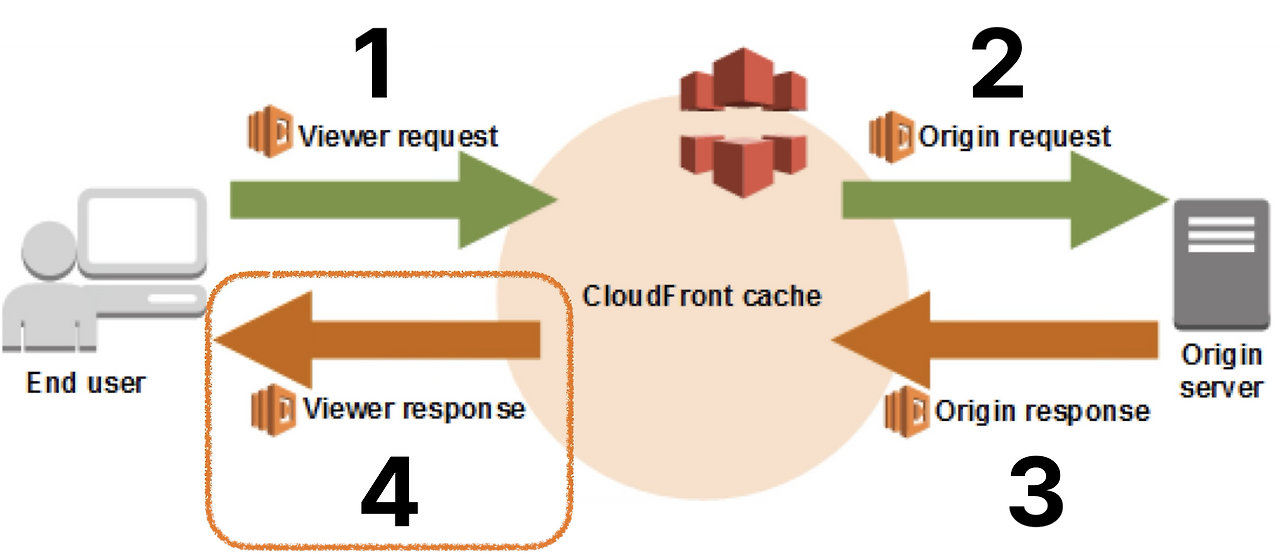
The requirements were only three things: inspect User-Agent, parse the query string, and create an HTML string.
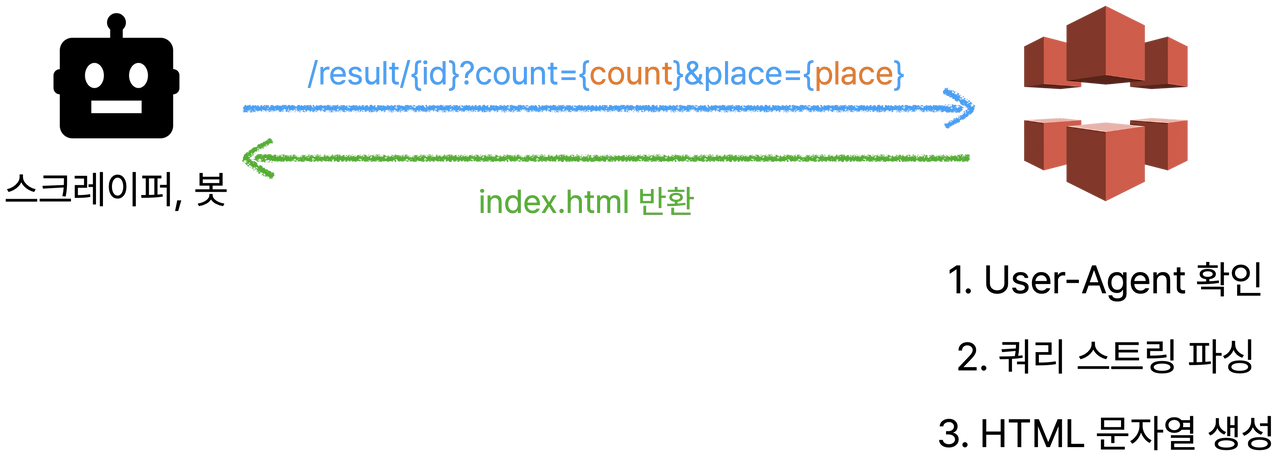
Because it does not need an S3 request, CloudFront Functions were the fastest, cheapest, and simplest fit.
The main handler: separate bots from visitors
The handler has two paths: return an OG response for a preview bot visiting a result page, or forward every other request to S3.
function handler(event) {
  var request = event.request;
  var qs = request.querystring;

  var isBot = checkIsBot(request.headers);
  var isResultPage = checkUrlPattern(request.uri);
  var count = getParam("count");
  var place = getParam("place");

  if (isBot && isResultPage && count) {
    return createOgResponse(request, count, place);
  }

  return request;
}
When the request is from a bot, the function stops it before the S3 origin and returns generated HTML immediately. A normal visitor skips that branch and continues to S3 through return request.
The minimal HTML returned to a bot
The bot response is deliberately small. It creates a dynamic title from the query string and places it in an HTML template.
function createOgResponse(request) {
  var title = createDynamicTitle(request.querystring);
  var html = `
    <!doctype html>
    <html lang="en">
      <head>
        <meta property="og:title" content="${title}" />
        <meta property="og:image" content="https://example.com/og.png" />
        <meta property="og:description" content="..." />
      </head>
      <body></body>
    </html>
  `;

  return { statusCode: 200, body: html };
}
There is no multi-megabyte React bundle and no complex CSS—only the <head> and Open Graph metadata a bot needs. The response is small, so scraping it is fast as well.
Result
After deployment, shared links displayed a preview card whose title and image reflected the selected place and number of people. We preserved the existing CSR and S3/CloudFront architecture, avoided an SSR migration, and solved the dynamic OG tag problem with one lightweight CloudFront Function.

Closing thoughts
In our case, exposing the necessary result information in URL parameters was acceptable. Query strings are visible to anyone with the URL, however, so this approach is not suitable for personal or sensitive data. In that case, use a different security strategy.
If you are facing a similar issue in a statically hosted CSR application, a lightweight edge function is worth considering.